Guides / How to export a workflow
GoHighLevel to JSON: How to Export Workflows (and Back Them Up)
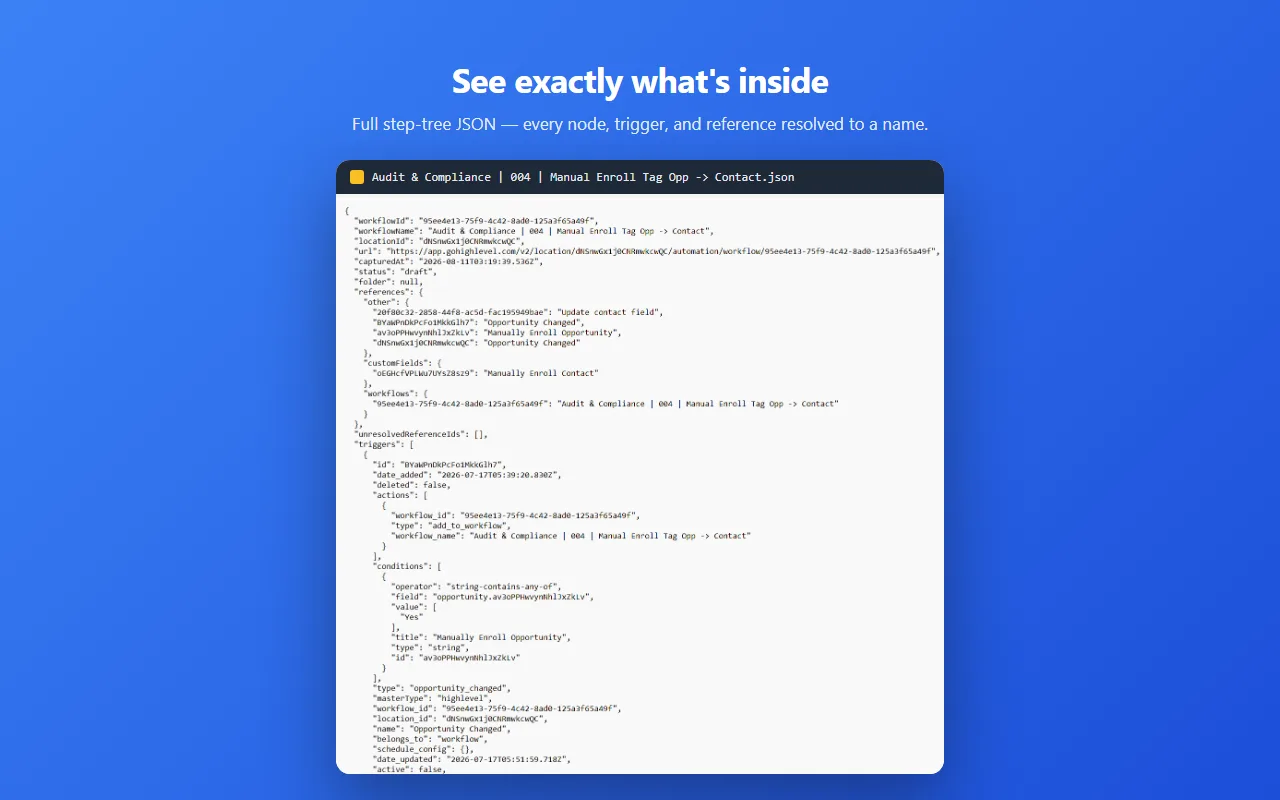
GoHighLevel has no native one-click export of a workflow as a JSON file — snapshots copy whole sub-accounts, not single workflow trees. To get a true workflow JSON you need a browser extension: open the workflow, click Export in the GHL Workflow Backup & Audit extension, and a clean JSON file downloads. That JSON also converts to Excel for audits.
Why there’s no export button
Workflows live inside the sub-account editor as editable state, not documents. You can duplicate one within the same account, but there’s no download, and the public API doesn’t return the step-tree either. That’s fine until someone changes a branch on Tuesday and by Friday nobody remembers what it did.
Method 1: Screenshots
Open the workflow, zoom out, screenshot. Maybe also click into each step and photograph its settings panel.
Works for: a one-off record that a workflow exists and roughly what it does.
Fails at: everything else. Settings hidden behind dropdowns never make it into the shot: wait steps, filters, custom values, notification bodies. You can’t compare two screenshots to see what changed, and rebuilding from one means retyping the whole thing.
Time cost: 10 to 20 minutes per workflow. Fidelity: low.
Method 2: The Snapshot trick
Agency plans can export a sub-account as a Snapshot: a packaged template of the entire account (workflows, funnels, pipelines, calendars, custom fields) that imports into another sub-account.
Works for: cloning a whole account setup, or moving everything to a fresh sub-account.
Fails at: single-workflow backup. It’s all-or-nothing per asset group, a Snapshot is a deploy artifact rather than a readable record (no diffing month-over-month), and importing one to “restore” a workflow drags every other included asset along with it. It also requires agency-level access, so contractors working inside someone else’s agency can’t use it at all.
Time cost: 15 to 30 minutes plus import cleanup.
Method 3: An extension that reads the builder
GHL Workflow Backup & Audit pulls the complete step-tree of whichever workflow you have open (every node, trigger, branch and setting) and saves it as clean JSON.
- Install from the Chrome Web Store.
- Open any GoHighLevel workflow in the builder.
- Click the extension icon. The JSON lands in your Downloads folder.
- Optional: select whole folders for a bulk export in one run.
What you get: nodes in execution order, triggers with filter conditions, published/draft status, settings-tab metadata, and readable names instead of raw IDs. Files are named like Workflow Name - a1b2c3 - 2026-08-16_14-30-02.json, so a folder of exports is itself a version history.
Because it’s structured data, you can diff two exports to see what changed, drop one into an AI assistant and ask what the workflow does, or hand a client a readable record. Free tier covers 5 single exports and 1 bulk export; after that it’s $19.99 once.
Honest limits: the extension reads the data the builder loaded, so if GoHighLevel changes their app, capture can break until we ship a fix. Open an export and glance at it before treating it as your only backup; that advice applies to every method on this page.
GoHighLevel to Excel or CSV (from the JSON)
The JSON is the backup. A spreadsheet is what you hand someone who has to read it.
- Export the workflow JSON.
- Excel: Data → Get Data → From File → From JSON. Power Query opens the file and you expand the nested levels down to the rows you want. Excel 2016 and later, including Mac.
- Google Sheets: run the file through any JSON-to-CSV converter first, then File → Import the CSV. Sheets’ import accepts .csv, .tsv, .xlsx and .ods — not .json — so handing it the export directly gets you nothing.
- Keep the JSON as the backup; the spreadsheet is the readable audit copy.
A workflow is a tree, not a table, so neither route drops out as tidy rows of triggers and actions on the first click. Expect to expand a few nested levels and to end up with one sheet per branch rather than one row per step. That is still far faster than retyping a workflow into a doc, which is the alternative.
Which one should you use?
| Screenshots | Snapshot | This extension | |
|---|---|---|---|
| Captures every setting | ✗ | ✓ | ✓ |
| Single workflow only | ✓ | ✗ | ✓ |
| Readable / diffable later | ✗ | ✗ | ✓ |
| Works on non-agency accounts | ✓ | ✗ | ✓ |
| Time for one workflow | 10-20 min | 15-30 min | ~10 sec |
Rule of thumb: Snapshots for deploying account templates to new clients. JSON exports for knowing what your automations say and keeping history. Screenshots for neither. Related: Snapshots vs real backups, in depth.
FAQ
Can you export GoHighLevel workflows to JSON?
Not natively — GoHighLevel has no one-click workflow JSON export. The GHL Workflow Backup & Audit Chrome extension exports single workflows or whole folders as clean JSON files.
How do I convert GoHighLevel JSON to Excel or CSV?
Import the exported JSON file into Google Sheets or Excel, or pass it through any JSON-to-CSV converter. The JSON is the backup; the spreadsheet is the readable audit copy.
What is the difference between a snapshot and a JSON export?
Snapshots package whole sub-accounts for deployment and cannot restore one workflow tree, while a JSON export is a per-workflow file you can version, diff, audit and re-import.
Is there a free way to try it?
Yes — the free tier includes 5 single exports, 1 bulk export and 5 single imports before the one-time license is needed.
Can I copy a workflow to another sub-account?
Not natively across locations. A Snapshot moves the whole account; for one workflow, export its JSON and rebuild from that.
Is exporting safe? Will it change my workflow?
Every method here is read-only. Nothing writes back to GoHighLevel.
5 single exports, 1 bulk export and 5 single imports free. Pricing and what the license adds are on the product page.
Would rather not do it yourself? I also take GoHighLevel workflow builds as scoped, fixed-price work.
More on this: Snapshots vs real backups · all guides