Guides / Copy a workflow between sub-accounts
Copy a GoHighLevel workflow to another sub-account
Quick answer: if you are an agency admin, HighLevel copies a workflow itself. In the workflows list, open the menu beside the workflow and choose Copy to Sub-Account. It only reaches sub-accounts you can access, and it clears any reference it doesn’t carry. When that won’t do, because you aren’t an agency admin, the target is in another agency, or you want a file you can keep, export the workflow asclean JSONand restore that file into the other sub-account.
The problem
Inside one sub-account, workflows can be duplicated. Across sub-accounts, HighLevel’s own Copy to Sub-Account handles the common case, if you are an agency admin and both sub-accounts are within your reach. Outside that, there is no export button, and the public API doesn’t return the workflow’s step-tree either.
So when you’ve built a 20-step nurture sequence for Client A, Client B needs the same thing, and the copy option isn’t there for you, the platform’s answer is: start typing. And hand-rebuilding misses things. A branch filter nobody wrote down. A custom value that resolved differently than you remembered. A webhook URL pointing at the old account. Each miss is a silent breakage you find out about from the client.
Method 1: HighLevel’s Copy to Sub-Account
If you are an agency admin, start here. In the workflows list, open the menu beside the workflow, choose Copy to Sub-Account and pick the target. HighLevel copies that one workflow across as a draft and keeps a history of each copy and its status. The steps are in HighLevel’s help article (opens in a new tab).
It carries the things a workflow most often points at: contact tags, contact and opportunity custom fields, custom values, pipelines and their stages, and email and SMS templates. Every other reference is cleared from the copy before it lands, so a step that pointed at, for example, a calendar or a form arrives empty and needs wiring up again.
Where it stops:
- It needs an agency admin. Sub-account users, and freelancers working inside a client’s sub-account, don’t get the option.
- It only reaches sub-accounts you can access, so it doesn’t cross from one agency to another.
- It leaves no file: nothing to diff, archive or hand to a client, and no record of what the workflow said before the copy.
If none of those apply, use it. The other methods are for when one does.
Method 2: Rebuild by hand
Sometimes this is the right call. A three-step reminder flow? Rebuild it. Opening the source and target side by side and retyping beats setting up any tooling for that size of job.
- Triggers, with every filter condition written down
- Branch conditions, including the “else” paths
- Wait steps and their exact durations
- Email/SMS templates; copy those separately if needed
- Webhook URLs (these are per-account; never assume)
- Custom values, custom fields, tags and pipelines the workflow references
- Exit criteria and notification settings
Realistic time cost: 10 minutes for a tiny flow, 45 to 90 minutes for something with branches and waits, then testing on top. Every step you retype from memory is a chance to get it subtly wrong.
Method 3: The Account Snapshot
Agency plans can package an entire sub-account as a Snapshot and import it into another sub-account. Workflows come along, with funnels, pipelines, calendars, custom fields and everything else.
For copying one workflow, it is heavy but workable. When you load a Snapshot into an existing sub-account you can pick individual assets and choose, per conflict, to override or skip. You still need agency-level access and a Snapshot that already holds the workflow, and an override can’t be undone through the load. For one workflow inside your own agency, Copy to Sub-Account is quicker.
If you actually want the whole setup cloned into a fresh sub-account, a Snapshot is the right tool. We compare the two jobs properly in Snapshots vs real backups. For a single workflow into an account that already lives and breathes, read on.
Method 4: Export it as JSON, then restore it
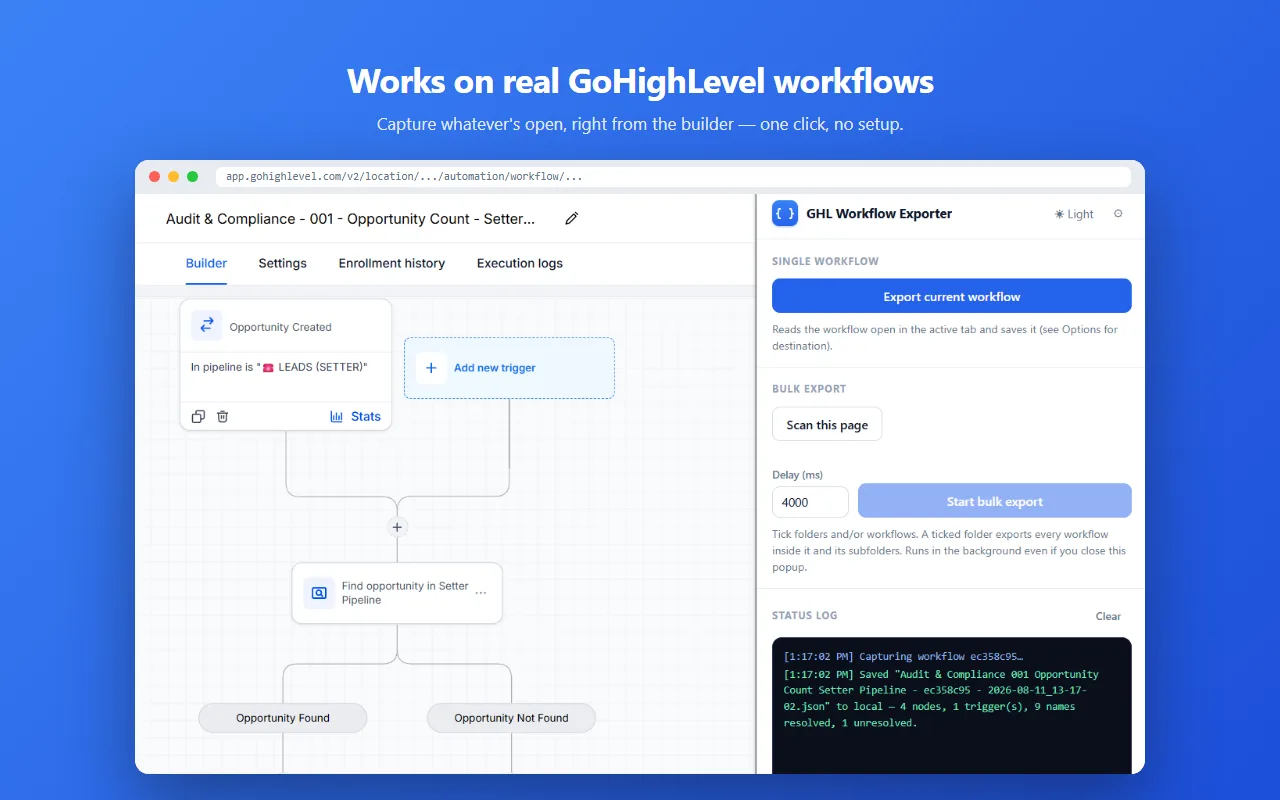
GHL Workflow Backup & Audit is a Chrome extension that reads the workflow you have open in the builder, writes its complete step-tree to your computer as structured JSON, and then writes that file back into a workflow in any sub-account you can reach. GoHighLevel’s public API still doesn’t accept workflow imports, so the restore goes through the same backend the builder itself uses, signed in as you.
- Install the extension from the Chrome Web Store. No account needed.
- Open the source workflow in the builder and click the extension icon. The JSON lands in your Downloads folder (or optionally straight to your own Google Drive).
- In the target sub-account, open a new empty workflow, or an existing one you mean to replace.
- On the extension’s Import tab, pick the exported file. It asks before overwriting a workflow that already has steps. A published target is written live, so use a new workflow or set the target to Draft first.
- Check the restored workflow against the JSON, then publish and test the triggers.
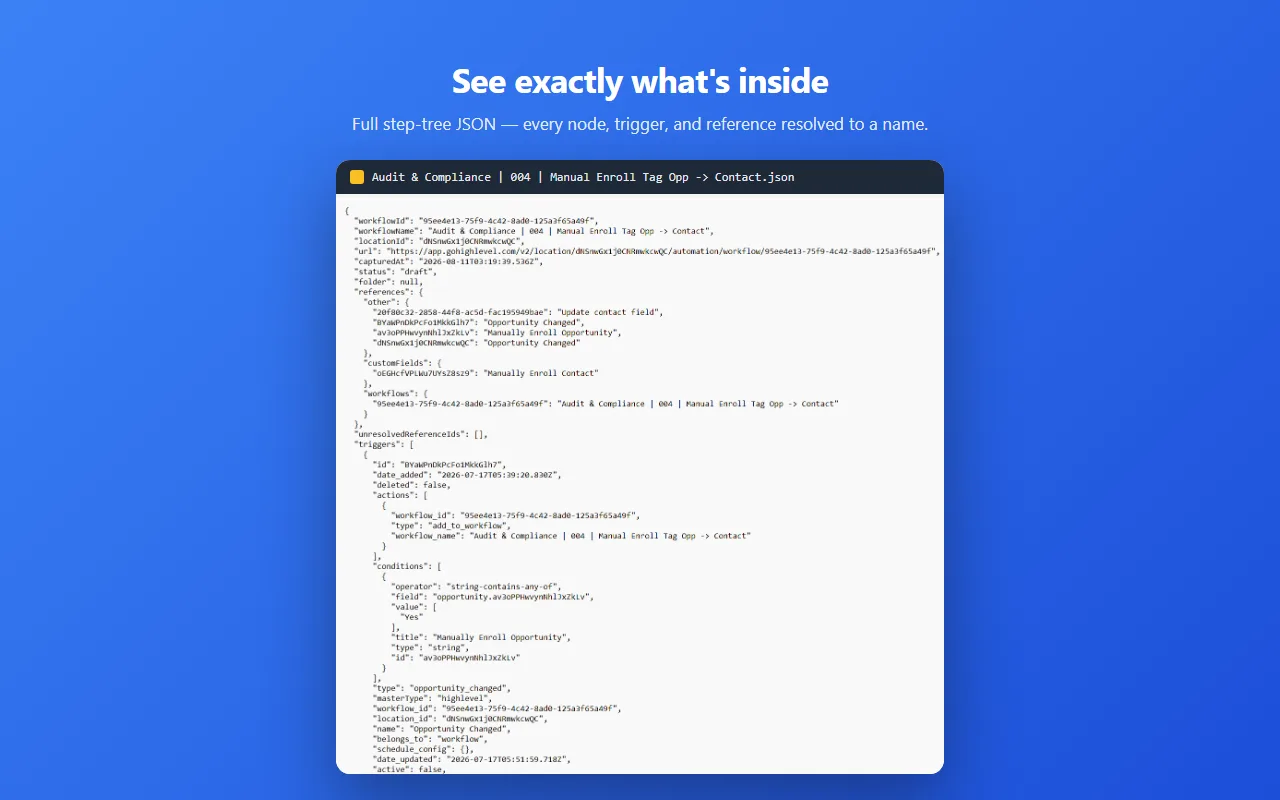
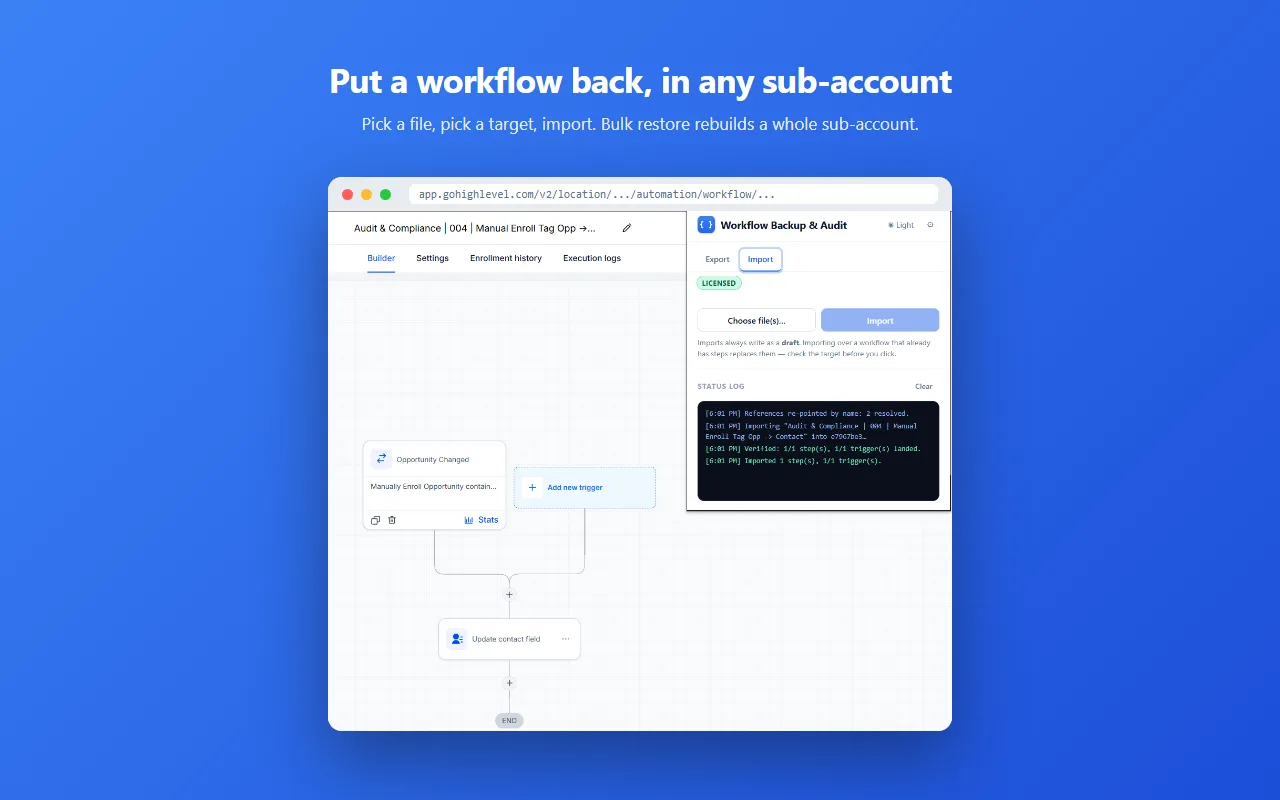
Because IDs are resolved to real names, you can see “Contact Tag = Appointment Booked” rather than a hex string. Wait durations, webhook payloads, notification toggles: it’s all in the file, which is what you check the restored workflow against before publishing.
One thing to settle before restoring: the restore re-points what the workflow references (tags, pipelines, custom fields) by name, using your Private Integration Token set in the extension, so anything the target account doesn’t have under the same name needs creating first, or triggers end up wired to nothing. Free tier covers 5 single exports, 1 bulk export and 5 single imports; after that it’s $19.99 once.
The import itself, including what happens to each reference and what to do before importing over a live workflow, is covered step by step in how to import a workflow into GoHighLevel.
Moving several workflows at once
If the migration is really “give the new sub-account our whole automation library”, exporting one workflow at a time gets old fast. The same extension has a bulk mode: point it at a folder in the workflows list and it exports everything inside recursively in one run, subfolders included. You end up with one dated JSON file per workflow, which doubles as a record of what the source account looked like on migration day.
Bulk restore runs the other way: hand it the folder of exports and it rebuilds them in the sub-account you are viewing, creating new draft workflows as it goes. It needs a license and a Private Integration token; single restores are in the free tier.
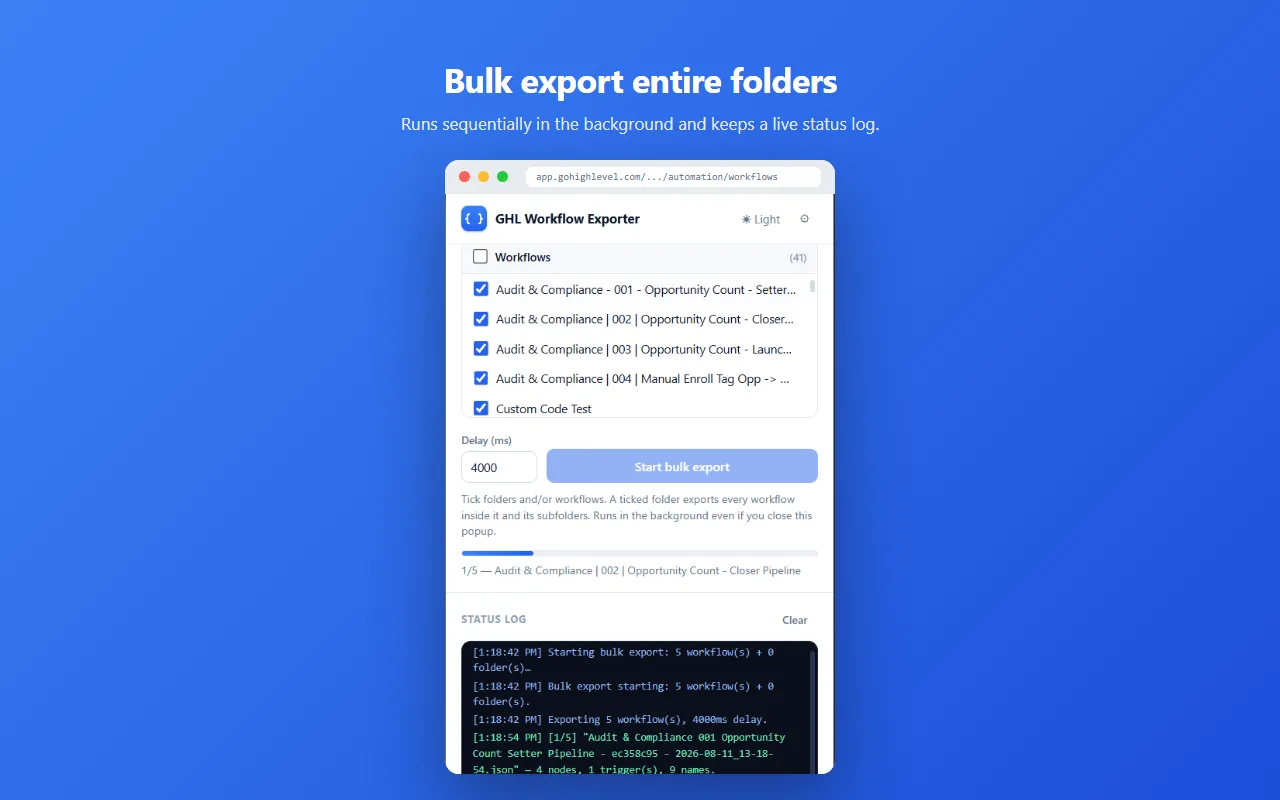
For a deeper look at how exports work generally, here are the three export methods compared.
Pre-move checklist
| Step | Do this | Why |
|---|---|---|
| Export source | Run the extension on the workflow (or folder) | You need the exact spec, not memory |
| Verify the JSON | Open the file, skim trigger and settings sections | A corrupt capture discovered late costs a full rebuild |
| Check dependencies | Confirm custom fields, pipelines, tags and templates exist in the target | Missing references make triggers fire into nothing |
| Restore | Import the JSON into a new or draft workflow | A published target is written live; a draft keeps contacts out of a half-built flow |
| Test triggers | Fire a test contact through every branch | Filters behave per-account; verify, don’t assume |
| Archive the JSON | Store the file with a date in the name | It’s your rollback record and proof of what changed |
FAQ
Can you copy a GoHighLevel workflow to another sub-account?
Yes, if you are an agency admin: HighLevel’s Copy to Sub-Account option copies one workflow to a sub-account you can access, carrying tags, custom fields and pipelines and clearing other references. Otherwise, or across agencies, export it as JSON and restore it with a browser extension.
Does the JSON export import into GoHighLevel in one click?
Not through GoHighLevel itself: its public API doesn’t accept workflow imports. GHL Workflow Backup & Audit restores the file through the builder’s own backend, signed in as you. It asks before overwriting a workflow that already has steps, and a published workflow is written live, so restore into a new or draft one.
Is exporting safe for my workflow?
Yes. Exporting is read-only: it reads what the builder already loaded in your session and writes a file locally. Only a restore you start writes back, and it never deletes a workflow.
GHL Workflow Backup & Audit is an independent product. It is not affiliated with, endorsed by, or connected to GoHighLevel / LeadConnector.
More on this: how workflow export works · all guides